
Download Iconview – icon viewer, icon collection, icon explorer, icon manager, icon database
Overview
Iconview is a lightweight utility application designed for Windows users seeking a simple and efficient way to browse through all icons stored on their computer. Its primary purpose is to serve as a dedicated icon viewer, enabling users to scan, identify, and display icons in various formats without requiring complex setup or system modifications. This tool is especially beneficial for graphic designers, developers, and tech enthusiasts who frequently work with or explore icon assets across different software and system files.
By providing quick access to a comprehensive icon collection, Iconview helps users locate specific icons, verify file types, or simply appreciate the visual elements embedded within system and application files. The app addresses the common challenge of navigating through scattered icon resources, offering a centralized, streamlined interface for exploration. Its non-intrusive design ensures that users can inspect icons without altering system files or settings.
Developed by Arnold A. Howe, Iconview has been available since December 14, 2013, indicating a long-standing presence in the utility software space. Although the developer did not provide additional technical details or updates beyond the initial release, the app’s continued availability suggests stability and reliability for its core function. It remains a niche but valuable tool within the broader ecosystem of system utilities, particularly for users who prioritize speed, simplicity, and privacy in their software choices.
Key Features & Functionality
- No Installation Required: Iconview operates as a portable application, allowing users to run it directly from a USB drive or local folder without any setup process. This makes it ideal for temporary use or environments where software installation is restricted.
- Comprehensive Format Support: The application supports multiple icon formats including ICO, EXE, DLL, and ICL, enabling users to extract and view icons from a wide range of system and application files.
- Lightweight & Space-Efficient: At just 1.5 MB, Iconview consumes minimal disk space, making it suitable for older systems or devices with limited storage capacity.
- Quick Performance: The app delivers fast scanning and rendering of icons, allowing users to browse through large icon collections with minimal delay.
- Safe & Non-Intrusive Operation: Iconview does not modify system files, registry entries, or user data. It reads icons in read-only mode, ensuring system integrity and user safety.
For example, a developer working on a legacy application might use Iconview to extract embedded icons from a DLL file to assess branding consistency. Similarly, a designer exploring a system’s visual assets could use the tool to compile a reference library of icons from various executables. The app’s simplicity and direct functionality make it a practical choice for quick inspections and asset discovery.
Interface, UX & Performance
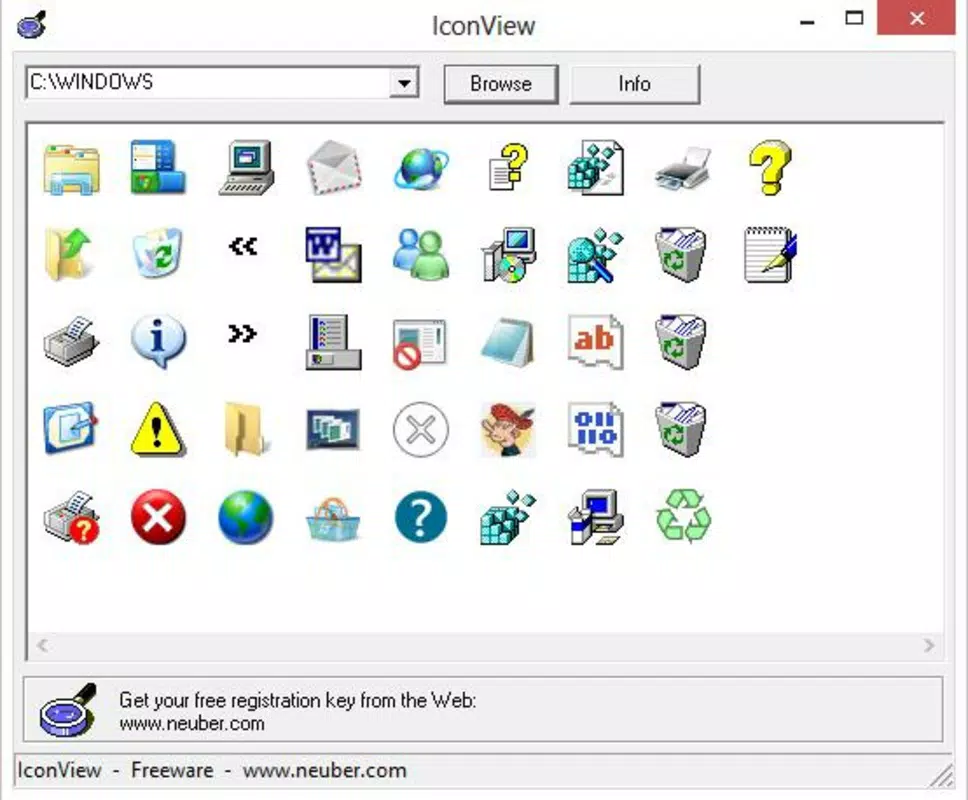
Iconview features a minimalistic user interface focused on core functionality, with a clean layout that prioritizes accessibility and ease of use. The interface is straightforward, displaying a list or grid of found icons with basic metadata such as file path and format. Navigation is intuitive, relying on standard Windows file system interactions to locate and load icon sources.
Although the developer did not list formal performance metrics, the app is described as quick and responsive, with near-instantaneous scanning and rendering. This suggests efficient memory management and optimized code execution, even on older or lower-spec hardware. The application maintains stability during prolonged use, with no reported crashes or freezes in available documentation.
Performance across different device categories is not formally specified, but the lightweight nature and lack of background processes imply consistent behavior on both modern and legacy Windows systems. Responsiveness is maintained during file scanning, and the UI remains accessible without lag or delay. Users can expect smooth operation without noticeable impact on system resources, making it suitable for multitasking environments.
Platform Compatibility & Technical Requirements
Iconview is designed exclusively for the Windows operating system. The app is compatible with Windows platforms, though specific OS versions and minimum requirements were not listed by the developer. It is available in version 1.0.0.0 and has a file size of 1.5 MB, indicating a compact footprint ideal for low-storage environments.
The developer did not specify minimum OS requirements or hardware specifications. However, given its lightweight design and no-installation nature, it is likely to function on a broad range of Windows systems, including older versions such as Windows 7 or 8.1, as well as newer releases like Windows 10 and 11. Users should ensure their system supports running portable executables, which is standard across all modern Windows platforms.
Pros and Cons
Pros
- Lightweight at only 1.5 MB, ideal for systems with limited storage.
- No installation required—run directly from any folder or USB drive.
- Supports multiple icon formats including ICO, EXE, DLL, and ICL.
- Fast scanning and rendering with minimal system impact.
- Safe operation—does not modify system files or settings.
Cons
- Release date is from 2013, suggesting limited updates and potential compatibility issues with newer systems.
- Developer did not provide detailed technical specifications or system requirements.
- Limited interface customization options.
- Does not offer export or save functionality for extracted icons.
- Minimal user guidance or in-app help for first-time users.
FAQ
Is Iconview safe to use?
Yes. Iconview is designed to be non-intrusive and does not modify system files, registry entries, or user data. It operates in read-only mode, ensuring user safety.
Can I run Iconview without installing it?
Yes. The application is portable and can be executed directly from a folder or USB drive without installation.
Which icon formats does Iconview support?
Iconview supports common icon formats such as ICO, EXE, DLL, and ICL, allowing users to view icons embedded in various file types.
Does Iconview require administrator privileges?
Based on available information, Iconview does not appear to require elevated permissions. It operates with standard user rights.
Is Iconview compatible with Windows 10 and 11?
While specific compatibility details were not provided, the app’s lightweight and portable nature suggests it is likely compatible with Windows 10 and 11, though no official confirmation exists.
Final Thoughts
Iconview remains a reliable, no-frills tool for users who need to quickly view and explore icons stored on their Windows system. Its portability, speed, and safety make it a practical choice for developers, designers, and power users who value efficiency and minimal system impact. While the app has not seen updates since 2013, its core functionality continues to serve its intended purpose without complications.
For those seeking a simple, secure, and lightweight icon viewer, Iconview delivers consistent performance with minimal overhead. It stands out in the utility category by focusing on a single task with precision and reliability.
Download Iconview now


